



zplCloud Blog
SVG to TTF: Ship Your Logos and Icons as a Printer Font Instead of Graphics
^A@N,50,50,E:MYICONS.TTF - one glyph reference per label instead of a 10 KB ^GFA block.
What a graphic costs on every single label
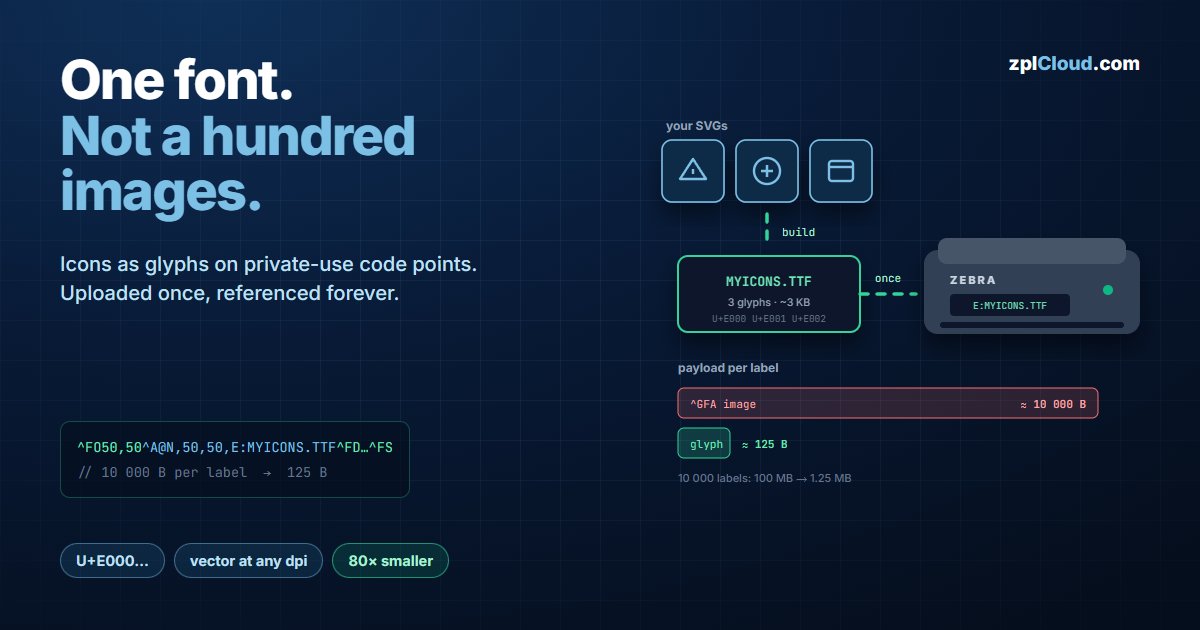
Most labels carry a logo or a set of pictograms. The default is to export each one as a raster image and embed it in the ZPL as a ^GFA block. It works, and it is expensive in three ways at once.
Payload. A ^GFA is a monochrome bitmap, one bit per dot, transmitted as hex. The math is simple:
bytes ≈ (width_dots × height_dots) / 8 × 2 (÷8 = bits→bytes, ×2 = hex encoding)
A modest 200 × 200 dot logo - about 25 × 25 mm at 203 dpi - is 200 × 200 / 8 = 5 000 bytes of bitmap, roughly 10 000 characters of hex in the data stream. Every label. The same logo at 300 dpi covering the same physical area is 295 × 295 dots ≈ 21 800 characters.
Quality. A bitmap is fixed to the resolution it was generated for. Print it larger, or move the design to a 300- or 600-dpi printer, and it is resampled - soft edges on exactly the element that represents your brand.
Speed. The printer receives, decodes and rasterizes the graphic on every label. Text it just draws.
A font is a glyph library the printer already knows how to draw
The SVG → TTF editor takes your SVG icons and builds one TrueType font. Each icon becomes a glyph on a private-use code point (U+E000, U+E001, …) - the Unicode range reserved for exactly this.
That font is uploaded to the printer's flash once, e.g. as E:MYICONS.TTF, from the designer's Zebra Fonts tab. Afterwards a label references a glyph:
^XA
^FO50,50^A@N,50,50,E:MYICONS.TTF^FD^FS
^XZ
Note the parameter order: ^A@ takes orientation, height, width, then the font path. ^A@N,E:MYICONS.TTF - orientation followed directly by the path - is not valid ZPL; the printer will fall back to a default font and you will spend an afternoon wondering why the icon is a letter.
Once the font is resident, ^A@N,50,50,E:MYICONS.TTF can be shortened to ^A@N,50,50 for subsequent fields in the same label - the printer keeps the last ^A@ font selection.
The numbers, with assumptions stated
^GFA image | TTF printer font | |
|---|---|---|
| Assumption | 200 × 200 dot icon, monochrome, hex-encoded | 3-glyph font, ~3 KB |
| Per label | ≈ 10 000 B | ≈ 125 B (one field with a glyph) |
| Uploaded | with every label | once, ~3 KB total |
| 10 000 labels | ≈ 100 MB | ≈ 1.25 MB + 3 KB |
| 100 000 labels | ≈ 1 GB | ≈ 12.5 MB + 3 KB |
That is an 80× reduction in transmitted bytes for that element. On a 115 200 baud serial link or a busy Weblink tunnel, that difference is the difference between a queue that drains and a queue that grows.
Scaling is free: the same glyph at ^A@N,20,20 or ^A@N,120,120 is rendered from vector outlines by the printer's font engine - crisp at 203, 300 and 600 dpi.
Flash is finite - check before you upload
Printer memory is not generous, especially on older desktop models. A GK420 has a few megabytes total. Before pushing a font, know its size:
- An icon font with a handful of glyphs: single-digit KB. Never a problem.
- A full Unicode text font is a different animal - the ZPLCloud Unicode font is 11 MB, its slim variant 7 MB. Those do not fit on a GK420 and are meant for printers with real flash.
- Query free space with
! U1 getvar "memory.flash_free"before a fleet-wide rollout.
Workflow
1. Drop the SVGs into the SVG → TTF editor. Each becomes a glyph on a PUA code point; the editor shows the assignment (U+E000 and up).
2. Build the font and upload it to the printers you choose - one action, whole fleet.
3. In the designer, open the icon library and drag the icon onto the canvas. It lands as a glyph element already bound to the right code point and font path. No hex codes typed by hand, no ^GF blocks to maintain.
A new icon or a changed logo is the same three steps: rebuild the font, push it, done. The label designs do not change - they reference a code point, and the code point now draws the new artwork.
When a graphic is still the right answer
Fonts are monochrome outlines. Use ^GFA for:
- photos, gradients, or anything with grey levels (which a thermal printer dithers anyway),
- one-off graphics that change per label - a per-shipment map, a signature image,
- artwork you receive as a bitmap and cannot cleanly vectorize.
For logos, hazard symbols, transport pictograms and recurring UI icons - the large majority of what is actually on a label - the font route is smaller, sharper and faster.
SVG that converts cleanly
The conversion turns paths into glyph outlines. Two rules save time:
- Convert strokes to outlines before exporting the SVG. A glyph is a filled shape; a 1-px stroke has no thickness to a font engine.
- Flatten text to paths. Text elements inside the SVG rely on a font that the converter has no reason to have.