


Product
QR with Divider
Label with divider line, left-aligned QR code and name field on the right – for ID cards or event badges.
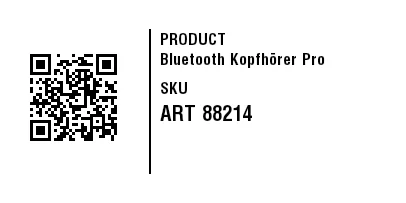
Rendered from this template's ZPL - exactly how the label leaves the printer. Click to enlarge.
ZPL code
^XA
^MD15
^PR5
^LL203
^PON
^PQ1,0,0,N
^MUd
^PW406
^MNY
^LH0,0
^PMN
^CI28
^BY,2,2,0
^FO30,52
^BQN,2,3,M
^FDA,https://zplcloud.com/p/ART-88214
^FS
^FO149,29
^GB2,145,2
^FS
^FWN
^FO160,33
^A0,16
^FB227,1,4,L,
^FDPRODUCT
^FS
^FWN
^FO160,53
^A0,16
^FB227,1,4,L,
^CI28
^FDBluetooth Kopfhörer Pro
^FS
^FWN
^FO160,82
^A0,16
^FB227,1,4,L,
^FDSKU
^FS
^FWN
^FO160,105
^A0,21
^FB227,1,6,L,
^FDART 88214
^FS
^XZ
Label with divider line, left-aligned QR code and name field on the right – for ID cards or event badges.
What is this label for?
It divides the label with a divider line: QR code on the left, name on the right. Ideal for ID or event badges.
What this template contains
- Name
- QR code
When to use it
- Product and packaging labeling
- Info and QR labels
- Digitizing links and contacts
How to edit it in the editor
Open it in the visual editor, change text, sizes, fonts and barcodes by clicking on each element and export to ZPL, PNG or PDF.