


Product
Product label
Product label with name, variant, article number, EAN-13 barcode and QR code – compact and scannable, ideal for shelves, bins and packaging.
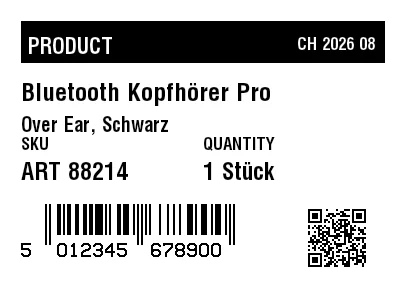
Rendered from this template's ZPL - exactly how the label leaves the printer. Click to enlarge.
ZPL code
^XA
^MD15
^PR5
^LL305
^PON
^PQ1,0,0,N
^MUd
^PW406
^MNY
^LH0,0
^PMN
^CI28
^BY,2,2,0
^FO21,21
^GB364,42,42,B
^FS
^FO28,31
^GB211,30,30,B
^FS
^FR
^FWN
^FO28,37
^A0,22
^FB211,1,6,L,
^FDPRODUCT
^FS
^FO240,33
^GB138,28,28,B
^FS
^FR
^FWN
^FO240,37
^A0,17
^FB138,1,4,R,
^FDCH 2026 08
^FS
^FO45,204
^BY2
^BEN,31,N,N
^FD5012345678900
^FS
^CI13
^FWN
^FO21,243
^AD,,9
^FD5
^FS
^CI13
^FWN
^FO57,243
^AD,,9
^FD012345
^FS
^CI13
^FWN
^FO151,243
^AD,,9
^FD678900
^FS
^FO308,207
^BQN,2,2,M
^FDA,https://zplcloud.com/p/ART-88214
^FS
^FWN
^FO21,137
^A0,17
^FB170,1,4,L,
^FDSKU
^FS
^FWN
^FO21,162
^A0,24
^FB170,1,6,L,
^FDART 88214
^FS
^FWN
^FO203,137
^A0,17
^FB170,1,4,L,
^FDQUANTITY
^FS
^FWN
^FO203,162
^A0,24
^FB170,1,6,L,
^CI28
^FD1 Stück
^FS
^FWN
^FO21,83
^A0,25
^FB364,1,6,L,
^CI28
^FDBluetooth Kopfhörer Pro
^FS
^FWN
^FO21,116
^A0,20
^FB364,1,6,L,
^FDOver Ear, Schwarz
^FS
^XZ
Product label with name, variant, article number, EAN-13 barcode and QR code – compact and scannable, ideal for shelves, bins and packaging.
What is this label for?
Product labels show what an item is and can be scanned at the checkout or for stock control. Clear typography and a correct EAN-13 barcode are essential so article number and EAN are never misread; the QR code links to the product information.
What this template contains
- Product name and variant
- Article number, quantity and batch
- Product barcode (EAN-13)
- QR code with product link
When to use it
- Shelf and shelf-edge marking
- Small-format product and packaging labels
- Scanning at checkout and POS
- Identification in the warehouse
How to edit it in the editor
Open it in the visual editor, change text, sizes, fonts and barcodes by clicking on each element and export to ZPL, PNG or PDF.
FAQ
What is the difference between a product label and a price label?
A product label identifies the article (name, article number, EAN-13 and QR code) without a price, while a price label for the shelf edge puts the price in the foreground. Take this one when you need to scan the article.
Can I change the barcode type?
Yes. Open it in the editor and switch from EAN-13 to UPC-A, Code 128 or Code 39 depending on your POS system; the layout adapts automatically.
Which label size is best?
Small formats such as 2x1" or 50x25 mm are common; this template is 2x1.5" (51x38 mm), scales cleanly and you can choose any size in the editor.